---
title: How do I update my payment information?
description: Update payment information
---
[Skip to content](https://support.fool.com.au/how-do-i-update-my-payment-information#main-content)
English - Australia
Show submenu for translations

Open main navigation
Close main navigation
- English - Australia
Show submenu for translations
How can we help you?
- There are no suggestions because the search field is empty.
1. [AU Help Centre](https://support.fool.com.au/?hsLang=en-au)
2. [Account](https://support.fool.com.au/account?hsLang=en-au)
3. [Account Assistance](https://support.fool.com.au/account?hsLang=en-au#account-assistance)
# How do I update my payment information?
Updating your payment information is simple.
- Once signed in to your Motley Fool account, you'll be able to click the '[Your Accounts](https://www.fool.com.au/premium/account/)' link from the Member dashboard.
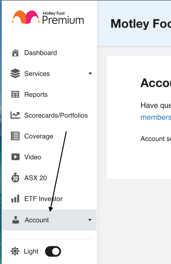
- Click the **'Update Credit Card'** tab as shown below.

- Update new payment details and add/update Name and Billing details and click the **Edit Payment** button**.**
- As per our Terms of Service, we include automatic renewal of your membership. Please contact our Member Services team if you wish for this to be turned off.
**Still can't find what you're looking for?**
Let us know by emailing our Member Services team at [membersupportAU@fool.com.au](mailto:membersupportAU@fool.com.au) and someone will get back to you.
- [Account](https://support.fool.com.au/account?hsLang=en-au#main-content)
- [Account Assistance](https://support.fool.com.au/account?hsLang=en-au#account-assistance)
- [Cancellation and Refund Policy](https://support.fool.com.au/account?hsLang=en-au#cancellation-and-refund-policy)
- [New To The Motley Fool?](https://support.fool.com.au/new-to-the-motley-fool?hsLang=en-au#main-content)
- [About Us](https://support.fool.com.au/new-to-the-motley-fool?hsLang=en-au#about-us)
- [Purchasing a Subscription](https://support.fool.com.au/new-to-the-motley-fool?hsLang=en-au#purchasing-a-subscription)
- [Already A Member?](https://support.fool.com.au/already-a-member?hsLang=en-au#main-content)
- [Our Services](https://support.fool.com.au/already-a-member?hsLang=en-au#our-services)
- [Premium Content](https://support.fool.com.au/already-a-member?hsLang=en-au#premium-content)
- [Foolish Investing](https://support.fool.com.au/foolish-investing?hsLang=en-au#main-content)
- [The Motley Fool's investing style](https://support.fool.com.au/foolish-investing?hsLang=en-au#the-motley-fools-investing-style)
- [Retirement](https://support.fool.com.au/foolish-investing?hsLang=en-au#retirement)
© The Motley Fool Australia
This Service provides only general, and not personalised financial advice, and has not taken your personal circumstances into account. The Motley Fool Australia operates under AFSL 400691. For more information please see our [Financial Services Guide](https://www.fool.com.au/financial-services-guide/).
Please remember that investments can go up and down. Past performance is not necessarily indicative of future returns. The Motley Fool Australia does not guarantee the performance of, or returns on any investment.
© 2010 - 202 The Motley Fool Australia Pty Ltd. All rights reserved.
ACN: 146 988 052
Australian Financial Services Licence (AFSL): 400691
The Motley Fool Australia Pty Ltd, 75 Nerang Street, Southport, QLD 4215
**Contact Details:**
Phone: (03) 8592 4841
Email: [membersupportAU@fool.com.au](mailto:membersupportAU@fool.com.au)
Our friendly customer service team will happily get back to you as soon as they can.
Copyright © 2025